Saturday, June 1, 2019

http://bit.ly/2d4kg1q

I distinctly remember what it felt like the first time I  started Android development and opened up Android Studio (well, Eclipse back then). I sat, stupefied, looking at the vast array of different windows, dialogues, and files. There’s so much to learn here, that even knowing which window you’re meant to be looking at can be hard.

There’s plenty of introduction to help you muddle through Android Studio on this site. But one of the biggest pieces of the puzzle is Gradle. Just what are those Gradle files? And why do you always have to wait for it to finish syncing before you can do anything?

This post will serve as an introduction to Gradle for complete beginners, to help demystify this actually rather useful tool and help give you a starting point for when things go wrong.

An introduction to Gradle for Android

Gradle is what we call a build tool or build system. More specifically, it is a JVM-based build system.

Despite not being very newcomer-friendly, Gradle has managed to gain popularity owing to its open-source nature, as well as its versatility, and use of plugins.

Build file Gradle

As we’ve already discussed, there are a lot of files involved in an Android app. Your resources need to be compressed, your source code needs to be converted to DEX files (Dalvik Executable), the APK needs to be signed. It’s a lot.

And all of that needs to be arranged nicely if you’re going to create a working APK. The images that will go into your app, the layout files, the Java. Then there are the libraries you use to extend your code’s capabilities. You also need to think about version control, about the key signature. I could go on.

Build process

From Google

Is it possible to build an APK without using Gradle? Yes: you can do this using the command line (ADB Bridge), but you would need to understand what each tool in the Android SDK does and how it contributes to turning your code into an installable file. And, as Google is constantly changing things and adding new features, this would also likely be an ongoing learning process. There are also alternative options out there, such as Apache Ant, but Gradle is the one that Google chose to support.

Gradle will use the appropriate tools to compile your various source files, and to compress everything into one nicely packaged APK. And all you had to do was to hit “build,” and make sure that all your files were saved in the correct folders.

Gradle also does a lot of other useful stuff behind the scenes – helping to reduce the size of the APK for example, and letting us build debug apps for testing (this is a “build type”).

Android studio development programmer

Sure, Gradle can often seem like the source of a thousand problems when it doesn’t work properly (when digging out an old piece of code from an older version of Android Studio for instance). But in fact, its presence makes life far simpler than it otherwise would be. In truth, Gradle is not the problem – it’s just the messenger.

What you need to know about Gradle

Gradle works by carrying out different scripts, which contain tasks. These tasks tell Gradle how to build your application – moving files located in specific folders, or compiling scripts in particular ways. You’ll find these scripts in your Gradle files, such as the two build.gradle files.

That’s right, there are (at least) two different build files – one for the entire project, and another for each module. The module generally refers to a single app build, and is where you’ll spend most of your time.

Android Studio

Here, you will be able to see a lot of the information that helps Gradle to do its job. That includes the target SDK, the package name, the version number, and more.

But perhaps the most common reason for a developer to dive into their build.gradle files themselves, is to handle dependencies – e.g. libraries.

Any time you want to add a new local or remote library to your project, you will add the dependencies to the “dependency block” found at the bottom of the module-level build.gradle file. Alternatively, you can do this through the menu system – which will update the relevant files for you.

Other Gradle files include:

  • settings.gradle – Which defines the modules in a project.
  • local.properties – Which points to your Android SDK.
  • gradle.properties – Which can contain a range of configuration properties but starts out empty.
  • gradle-wrapper.properties – Which defines and installs the correct version of Gradle needed for the project.

More uses for Gradle

You can also achieve other things by tinkering with your Gradle files. For example, Gradle offers support for multiple APKs, making it simple to create different versions of your app targeting different devices – these versions are called “flavors.”

Gradle will come into play if you want to create an instant app meanwhile, as you’ll need to create a feature module and then edit the build.gradle file to reflect that. That instant app Gradle file will also need a dependency pointing to the “:base” feature module. Instructions can be found here.

The good news is that instructions are readily available for anything you might want to do. If you should run into a problem, or if you should want to do something that involves different types of app “builds,” Google is your friend.

Sometimes an error will crop up if Gradle gets confused or can’t find a file, but this is increasingly rare. Hitting “clean project” will normally solve the problem.

If not, it may be that one of the files is using a deprecated configuration or other out-dated line. Android Studio will normally clue you in on how to solve the issue, as will another quick Google search.

Generally though, most of what you do in Gradle can be done through Android Studio’s own UI – meaning you rarely need venture down there. This is especially true if you’re creating an app with only one module.

Android Studio development

That means the most important job for a new developer, is simply keeping Gradle and Android Studio up to date.

Let Gradle handle the rest!


from Android Authority http://bit.ly/2WG0ErP

http://bit.ly/2d4kg1q

turo cars Turo

If Airbnb revolutionized travel by giving us the opportunity to rent out our houses, apartments, or spares room, then Turo is the Airbnb of cars. Here’s what you need to know about it!

What is Turo?

Turo is a peer-to-peer car sharing company. Formerly known as RelayRides, Turo allows car owners to make extra cash by renting out their vehicles, while providing a convenient and quick way to rent a car to those in need of transportation.

Editor's Pick

Unlike Uber or Lyft, Turo is not a ride-hailing app, but a service more akin to traditional car rental. This makes it ideal for longer journeys that you plan in advance – like that upcoming job interview out of town, or for exploring a new city at your own pace. Turo can also be cheaper than traditional car rentals and has hosts who don’t mind renting to drivers under 25.

Best of all, Turo offers something for every taste and budget: whether you want a luxury car to enjoy your vacation in style or a cheap but reliable vehicle, Turo has you covered. The service is available in the US, Canada, UK and Germany. So, how do you get started?

Signing up for Turo

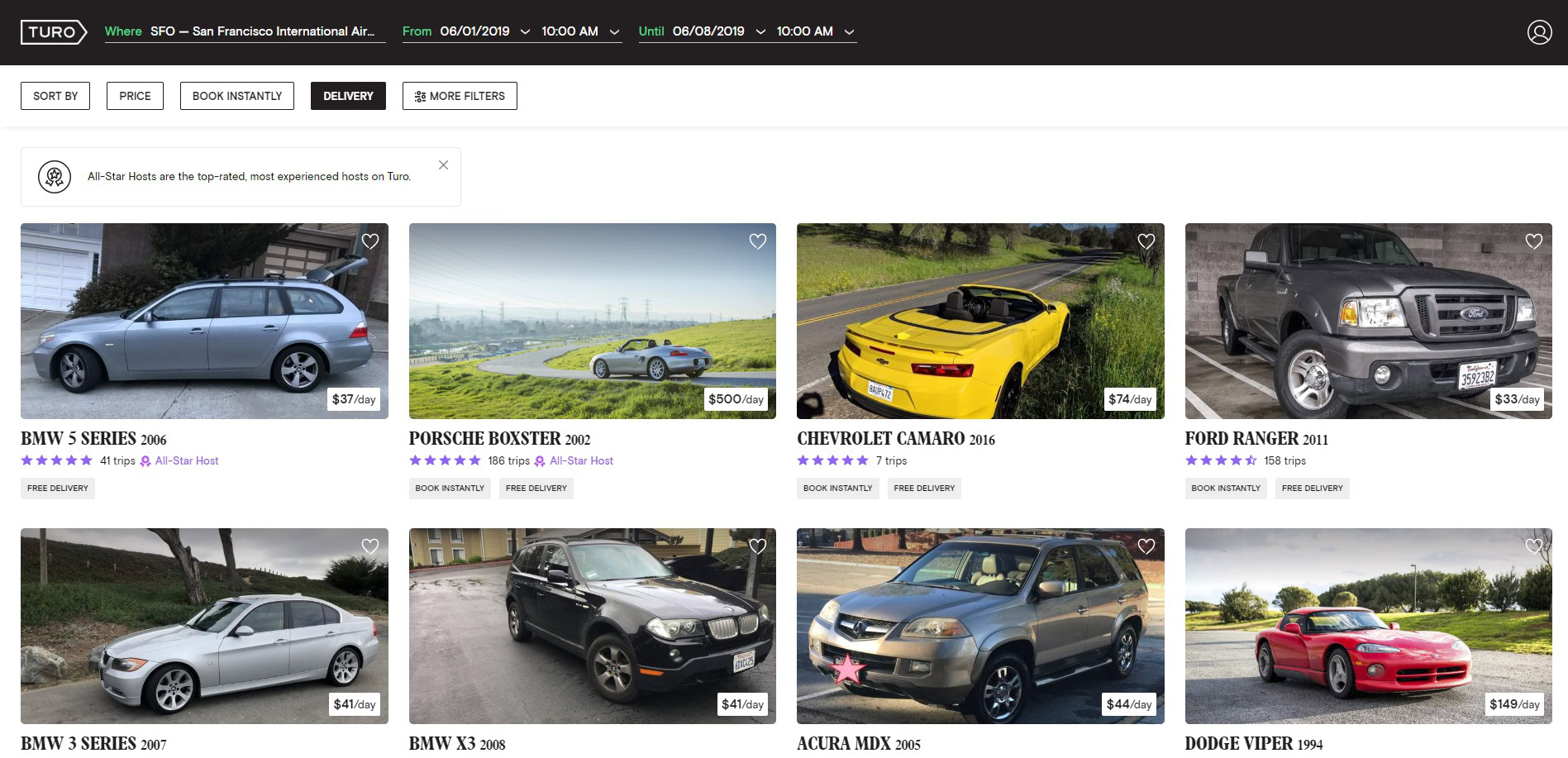
Initial registration is very easy – after downloading Turo from the Play Store or App Store you can sign up with your Google or Facebook account or with just your email address. You will not be asked to enter any personal details apart from your name until you decide to book or list a car. Once you’ve signed up, all you need to do to browse the available rental cars near you is enter a city, airport or address, as well as your travel dates.

Finding the right car

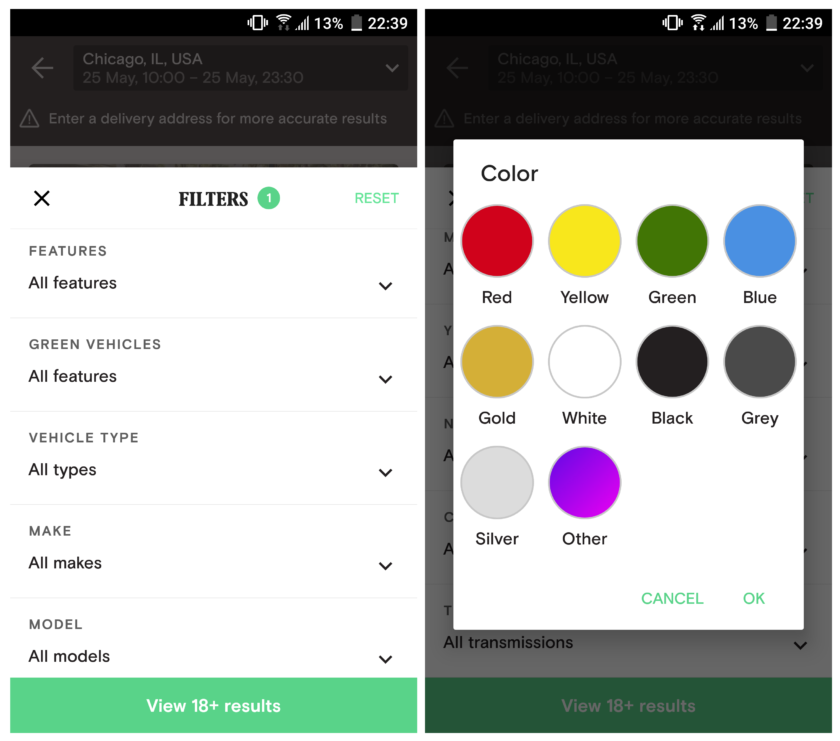
Want an environmentally friendly ride to your destination? Then booking a Tesla or any other electric car is a great option, which Turo provides. In fact, you can choose from over 800 unique makes and models. The multiple filters allow you to find just the right vehicle for you – whether it’s a car, SUV, minivan, or a truck. Not a fan of manual? Then you can choose cars with automatic transmission only. You can also sort by price, number of seats and even color.

Turo Rental Lamborghini


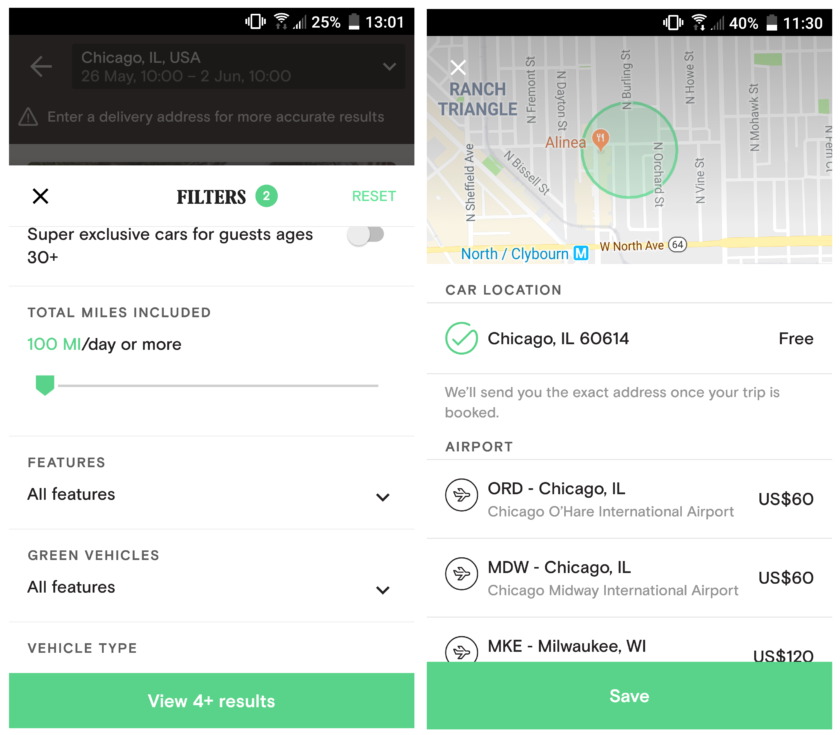
One thing you definitely need to pay attention to, however, is total miles or distance included. Hosts put limits on how many miles or km per day you can drive with their car. So, if you want to go on a road trip, you will need to calculate the distance you will travel. Every additional mile will incur a charge unless you request an extension from the app itself. This makes communication with hosts vital to a good experience. We therefore recommend you filter listings to only all-star hosts when you use the app for the first time.

Turo also has three additional classes: Business, Deluxe, and Super Deluxe class. As the name of the first suggests, using this filter will display the best cars for business travel. Deluxe and Super Deluxe class, on the other hand, provide exclusive cars for guests aged 25+ and 30+ respectively. You can still rent a Deluxe car even if you are under 25, but that will come at the cost of a $1500 refundable deposit.

Turo filters screenshot

If you’ve found a Turo car to your liking, an important step before booking is checking the host’s reviews and rating. As with Airbnb, these are your best indication on whether the person you are renting from is reliable. Nevertheless, your mileage may vary (pun intended), so be thorough.

At the bottom of every listing you will also find guidelines written by the host. Read those carefully before proceeding with the booking. Some owners do not allow pets in their vehicle, so if you are planning on taking your dog to the vet, you might need to look for a different car. No smoking policies are also very common. However, the most important thing to pay attention to is whether the host wants the car to be refueled and how you need to return/drop off the vehicle. Many will also require you to take photos or video of the interior and exterior of the car prior to driving. We recommend you do this anyway, so you won’t be held liable for any pre-existing damage to the car.

How booking and picking up works

Once you’ve found the right car on Turo, it’s time to book. But how does renting a stranger’s car through an app really work? It might seem complicated at first, but it’s not much of a hassle. It’s similar to Airbnb in many respects.

There are two types of bookings – Book Instantly, which doesn’t require owner approval and regular booking which requires the owner to confirm or decline your trip within eight hours. If you are new to Turo, we suggest you opt for a regular booking. Most hosts, especially all-star ones, will reply quite quickly, so unless you are in a real hurry, this is the better option.

Editor's Pick

When checking out, you will need to select a pickup and return location or have the car delivered to you (this will usually cost you extra). Hosts will list one or various locations that will be free or add an additional charge depending on distance. For example, a host is likely to list a location in their neighborhood as free, while changing the pickup or drop-off location to the city airport will cost you extra.

Turo pickup & miles

Once you’ve chosen the pickup or delivery location, there are five steps you need to complete your Turo booking:

  1. Add extras

Depending on the host there can be various extras you can purchase for an extra charge. Prepaid refuel, for example, is very common. It allows you to return the car at any fuel level. Some hosts will also offer child safety seats, additional cleaning and so on.

  1. Enter your information

As expected, you will need to fill your personal info before rental. That includes date of birth, license number, date of license issuance, etc. You can also scan your license directly through the app.

  1. Choose your Turo Shield Protection

Insurance is something that’s unavoidable when it comes to car rentals. Turo allows you to choose from Premium, Basic, or Minimum Coverage — each of which has varying physical damage protection. You can read more on how it functions in your country here.

  1. Enter your payment info

Finally, you have to add your payment info. Turo accepts most major credit cards, including American Express and Discover cards, as well as Visa and Mastercard debit cards linked to a checking account. In the U.S. and Canada, you can also pay with Google Pay, while Apple Pay is only currently available in the U.S..

  1. Message the host

Just like Airbnb, you need to write a short message to the car owner, introducing yourself and giving them some basic information about your trip. This is an important step, so don’t be too vague.

Once your booking has been approved, if you haven’t requested delivery, it’s time to pick up your car. How that is done differs from host to host. Some will meet you and hand over the keys in person at an agreed time and location. Take this time to ask them questions, especially if you think there were things not mentioned in the guidelines – for example, if eating or drinking in the car is permitted. Make sure to ask where the car documents are located, so you can have them ready in case you are stopped by the police, and so on.

However, meeting the host in person is not always the case. Some have come up with ingenious methods of handing over the keys to renters. One host on YouTube demonstrated how he puts the keys in lockboxes attached to a fence near the car and then texts renters the combination for them after they send him a photo of their driver’s license and themselves near the car. This is also possible with newer car models that can be locked/unlocked remotely. Whatever the case, make sure you ask your host about it and about returning the vehicle.

screenshot of turo car selection interface

Bonus insurance tip

Call your personal insurance company before renting through Turo. Some will offer full coverage under your normal policy, as they do for regular rental cars. You can also check if the same is offered by your credit card company. Although Turo itself states it is unlikely, users online claim that Discover insurance coverage for rental cars includes Turo.

Turo cancellation

Even if everything went smoothly with booking your ride, sometimes unforeseen circumstances can prevent us from traveling. What can you do in this case? If you need to cancel your Turo car rental, you can do so through the app or the company website. You are also advised to message the host/owner as soon as possible and let them know. According to Turo, “Guests may cancel free of charge up to 24 hours before their trip is scheduled to start. The total amount refunded will depend on when the guest cancels the trip and the length of the trip.”

The cancellation fee for trips longer than two days is one day’s trip cost, while journeys shorter than two days will cost you 50% of one day’s trip cost. The trip price and trip fee are included in the overall cost.

What if a host cancels on you, however? In that case you will receive a complete refund. Hosts will then be charged a fee and an automatic review mentioning the cancellation will be generated on their listing. To avoid last second cancellations from unreliable owners, always check their reviews but also have a plan B just in case. You can also read more about Turo’s cancellation policies here.

Turo vs traditional rentals

If you are still not sure whether Turo is worth it, let’s weigh its positives and negatives vs. those of traditional car rentals.

One of the biggest advantages Turo has is offering rentals to drivers under 21. While traditional car rental services in the U.S. usually do so too, it comes at the cost of paying large insurance fees. Turo can also be cheaper overall, if you are not too picky about the car model and year. It is ideal for short trips on a budget. Of course, this can change depending on the area you live in, so always be sure to compare prices before shelling out your hard-earned money. Rental car delivery is also a point in Turo’s favour – with most traditional car rental services you will have to pick up your rental vehicle yourself.

Returning the car is where Turo might be at a disadvantage. If you are going on a long one-way trip, say moving to a new city, it is not likely that a private owner will agree to pick up their car hundreds of miles away from where they live without charging a large fee. Traditional rental services, on the other hand, might have another location at your destination town/city, making it easy to drop off the car once you’re done using it.

Nevertheless, Turo is quick and convenient to use. The peer-to-peer car-sharing company has earned its “Airbnb of cars” moniker, and you haven’t checked it out yet, there’s no better time than now!

Read next: 10 best car rental apps for Android

Have you used Turo before? What was your experience? Let us know in the comments below.


from Android Authority http://bit.ly/2MCxrKP

http://bit.ly/2d4kg1q

The AAPicks team writes about things we think you’ll like, and we may see a share of revenue from any purchases made through affiliate links.

The Complete Photography Professional Bundle Woman

There’s an amateur photographer in all of us. Whether you want to step up to professional level, or just smash it on your Instagram feed, today’s deal can help.

The Complete Photo Professional Bundle will professionally train you in photography without sending you into eternal student loan debt. It’s also on offer today.

Even if the extent of your current photographic skills is snapping an off-center pic of your bestie, this online video training bundle will teach you how to take professional photographs. With enough study, you could even make money from them. Eight online learning kits and 30 hours of instruction cover virtually every aspect of professional photography.

Aimed at all levels, you’ll start with the fundamental concepts of photography like aperture, shutter speed, and exposure. You’ll move on to learn awesome photo composition skills, such as how to play with perspective, and how to find the best light sources while photographing outdoor subjects.

The Complete Photography Professional Bundle

You’ll also be trained in the all-important Adobe Photoshop to retouch your images to professional industry standards. You could even learn how to successfully start your own business.

The Photography Bundle at a glance:

The Complete Photography Professional Bundle is worth a combined $770, but this weekend it’s on sale. Right now you can take 95 percent off and get lifetime access to all eight courses for just $35.

The deal ends soon, so join the hundreds of people who’ve already signed up. Hit the button below to get started.

This deal not quite right for you? To see all our hottest deals, head over to the AAPICKS HUB.


from Android Authority http://bit.ly/312BT8r

http://bit.ly/2d4kg1q

Huawei CES 2019 booth Logo

Huawei has had a very rough two weeks. After being placed on the U.S. Entity List, major companies like Google, Intel, Qualcomm, Arm, and others have stated they will cut ties with Huawei if it remained banned by the government.

The company currently has a permit to work with U.S. companies through August, but that could easily expire before America’s government reverses its decision. So we decided to ask you, do you think Huawei deserves its ban? Here’s what you had to say.

Do you think the ban on Huawei is fair?

Results

As you can see, over 50 percent of the 7,000 readers who voted in this week’s poll believe that Huawei doesn’t deserve its current ban. Taking a look at the comments, it appears that most feel this way because the U.S. has yet to provide any evidence to the public, proving that Huawei is a national security threat.

Several commenters shared how they could see why the U.S. government could block Huawei from providing 5G infrastructure due to fears of foreign interference, but blocking the entire company is unfair. In their opinions, allowing consumer products such as smartphones and laptops shouldn’t be a problem.

Despite these results, 23 percent of the voters believe that Huawei deserves its current ban. According to them, Huawei has a long history of clashing with foreign nations and has too strong of ties to the Chinese government.

Noteworthy comments

Here are some of the best comments from last week’s poll explaining why they voted the way that they did:

  • Only if we get proof that they are actually spying
  • I think in the grand scheme of it all, it’s fair. However, I think the rationale they gave is quite bogus.
  • Edward Snowden had more proof that the US government spied on Americans than what they told us about Huawei. If China would really want to spy, they would infiltrate other brands that do manufacturing in China since it would pass even more covertly.
    Editor's Pick
  • I don’t see Android has anything to do with national security. Instead, I see this is a dirty way to block the growth of a company.
  • As a Huawei phone user, I have to disagree with the ban on its phone business. If the actual communications infrastructure is at risk I do not know, but ban that part, not the phones and laptops. Trump has already said that when a trade deal comes Huawei will most likely be part of it, so apart from the communications bit this sounds like a negotiation tactic to me
  • None of us know enough of the details to have a valid opinion. That said, a Chinese company, subsidized by the government and sworn to provide whatever that government requests, may not be the right partner for building our communications infrastructure.

That’s it for this week, everyone. As always, thanks for voting, thanks for the comments, and don’t forget to let us know what you thought of the results below.


from Android Authority http://bit.ly/2wzn1As

http://bit.ly/2d4kg1q

The AAPicks team writes about things we think you’ll like, and we may see a share of revenue from any purchases made through affiliate links.

Zoolz Cloud Storage Backup

Losing precious data is a heartbreaking experience. When hours of work, corporate documents, or photo albums go missing, you’re in a world of pain. That’s where Zoolz Cloud Backup can save you from future headaches.

The beautiful thing about Zoolz is its convenient ability to let you access and retrieve files anytime on any device. It’s always there for you if the worst happens.

Zoolz Cloud Storage

A typical cloud storage service can become expensive quickly. That’s why we’re spotlighting a deal today on Zoolz that should be palatable to your wallet. Right now you can get a one-year subscription to 1TB of cloud storage for just $19.99.

Zoolz is one of the leading cloud storage solutions today, sitting securely on the renown AWS infrastructure. AWS is trusted by business juggernauts such as NASDAQ, NASA, Netflix, and more.

Zoolz at a glance:

  • Backup 1TB of Cold Storage with no limitations.
  • Retrieve Cold Storage files in approximately three to five hours.
  • Endlessly protect computers, network storage, and external devices.
  • Get high-quality service at one of the lowest prices in the market.
  • Preview backed up data via the mobile app.

If you want more than just a one-year subscription, Zoolz is also offering an even better deal on the three-year plan with 94 percent off.

It would be a disaster if something were to happen to your data, so this deal could be your saving grace. Head on over to Tech Deals while this promotion is still available. Hitting that button below takes you there. 

This deal not quite right for you? To see all our hottest deals, head over to the AAPICKS HUB.


from Android Authority http://bit.ly/2HQFlvE

http://bit.ly/2d4kg1q

This is the featured image for the 295th Android Apps Weekly
Welcome to the 295th edition of Android Apps Weekly! Here are the big headlines from the last week:

  • Apple is in some hot water this week. It allegedly violated the privacy of users and sold iTunes and Apple Music listening data. The lawsuit says you can buy a list of people who are a certain age range and listen to certain types of music. Of course, these are just allegations and the lawsuit is only for people in Rhode Island and Michigan right now.
  • The British GCHQ wants more power over your text messages and companies are fighting back. The Ghost Proposal would force text apps to include law enforcement without anyone knowing. This is, obviously, a huge privacy concern and most companies want nothing to do with it. A group signed an open letter to abolish such a thing with signatories including Apple, Google, Microsoft, WhatsApp, the EFF, and many others. Hit the link to learn more.
  • Flipboard announced a data breach this week. A third party apparently accessed the app’s databases multiple times between June 2, 2018 and March 23, 2019 along with April 21 and 22, 2019. The breach gave the third party access to things like usernames, passwords, and email addresses. We strongly recommend changing your info as soon as possible if you ever used Flipboard before.
  • The World Health Organization says gaming disorder is now a recognized mental illness. It’s basically the same as gambling addiction but with video games. Symptoms include ignoring real life to play video games, prioritizing gaming, and continuing to game despite negative consequences. There are some critics who don’t believe the WHO has significant, robust evidence to make such a conclusion. You can read all of it at the link.
  • There was a huge surge of Pokemon information this week, including several new announcements. The biggest one is Pokemon Home, a cloud service that lets you store Pokemon from Pokemon Go, Nintendo DS and 3DS Pokemon games, and Nintendo Switch Pokemon games. In addition, Pokemon Sleep and Pokemon Go Plus were announced as well. Finally, we got some news about Pokemon Masters, a new Pokemon game. As usual, hit the link to see all the details.
  • Google Play had two major policy changes this week. The first one banned marijuana delivery services in areas where marijuana is legal. You can still order from these apps, but it requires redirection to an external website in order to work. Additionally, Google Play added much stricter policies for kids’ apps and games. The new policies include stricter regulation over ads along with some other stuff.

Toy Story Drop

Price: Freemium
DOWNLOAD ON GOOGLE PLAY
Toy Story Drop is a new match-three game with a Toy Story theme. You know how these games work. You move blocks around until they match up and disappear. The game includes hundreds of levels, various throwbacks to previous Toy Story movies as well as Toy Story 4. It's a promotional game for the movie to get people more excited and it functions as a serviceable arcade puzzler for fans of the series. The freemium elements are annoying, but it's otherwise decent overall.
DOWNLOAD ON GOOGLE PLAY

Firefox ScreenshotGo Beta

Price: Free
DOWNLOAD ON GOOGLE PLAY
Firefox ScreenshotGo Beta is a new app for sorting and finding old screenshots. It finds screenshots with various things like text. In addition, you can extract text from screenshots for use in other apps. You also get a floating screenshot button, various sorting options, and more. It's definitely a boon for those with a ton of screenshots in their gallery. The app is also completely free and surprisingly stable for a beta release.
DOWNLOAD ON GOOGLE PLAY
Firefox ScreenshotGo Beta

Warriors of Waterdeep

Price: Free / $9.99 per month / Freemium
DOWNLOAD ON GOOGLE PLAY
Warriors of Waterdeep received a global release this week. It's a new RPG with turn-by-turn combat mechanics and plenty of customization. YOu form a team of heroes from a large pool and battle it out against the bad gu ys. The game also includes tons of loot, a story mode, and various challenges. The freemium elements are a standout annoyance in this one and the game heavily promotes its $9.99 per month subscription service. We definitely don't recommend this one to everybody, but the mechanics are solid if you don't mind footing the bill.
DOWNLOAD ON GOOGLE PLAY

Adobe Premiere Rush

Price: Free / $9.99 per month
DOWNLOAD ON GOOGLE PLAY
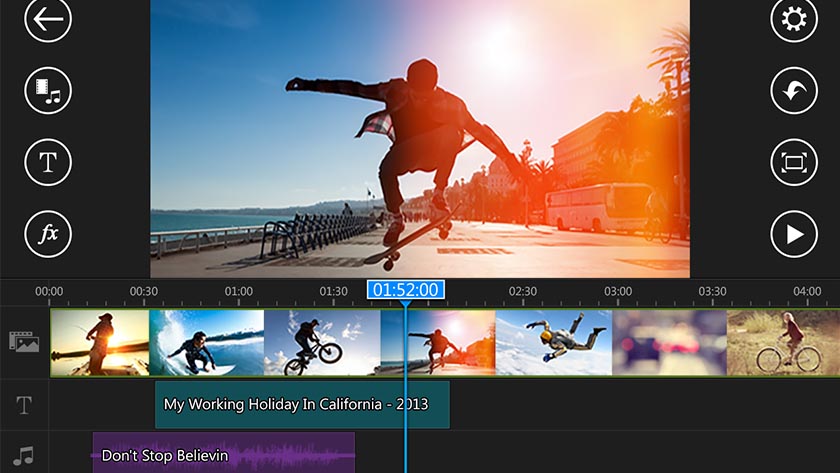
Adobe Premiere Rush also received a wide release recently. The app functions as an all-in-one vlogging app with a bunch of video editing features. You can shoot video with the integrated camera, edit that footage in the editor, and then upload when it's done all from the app. Additionally, you get multi-track support and cloud syncing support. It's missing some notable, if somewhat niche features like clip speed settings, but Adobe should add that stuff in a future update. The premium version runs for $9.99 per month.
DOWNLOAD ON GOOGLE PLAY

Talion

Price: Freemium
DOWNLOAD ON GOOGLE PLAY
Talion is a new MMORPG from Gamevil. It plays like many MMORPGs on mobile. You enter into a huge, open world, do all of the quests, and fight all of the bad guys. The game has your usual MMORPG mainstays like online PvP, customizable characters, cooperative boss raids, and more. The graphics are also serviceable, but hardly unique. It suffers from some early server issues, so maybe give a week before you download and start playing.
DOWNLOAD ON GOOGLE PLAY

10 best video editor apps for Android! (Updated 2019)

15 best RPGs for Android! (Updated 2019)

If we missed any big Android apps or games news or releases, tell us about it in the comments!


from Android Authority http://bit.ly/2wwp1tc

http://bit.ly/2d4kg1q

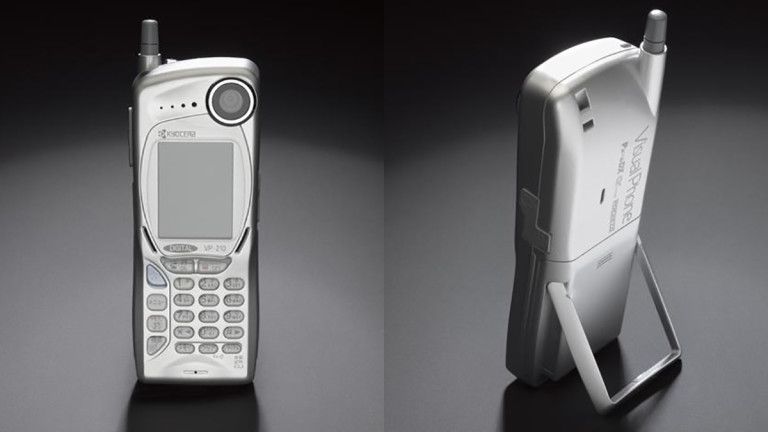
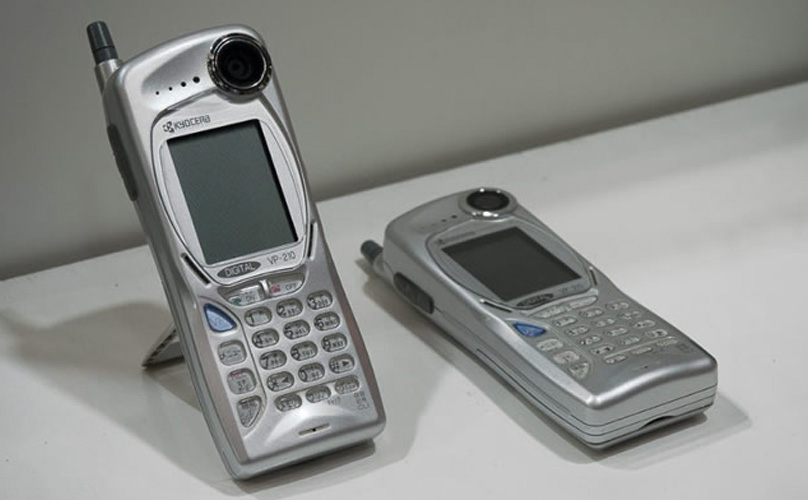
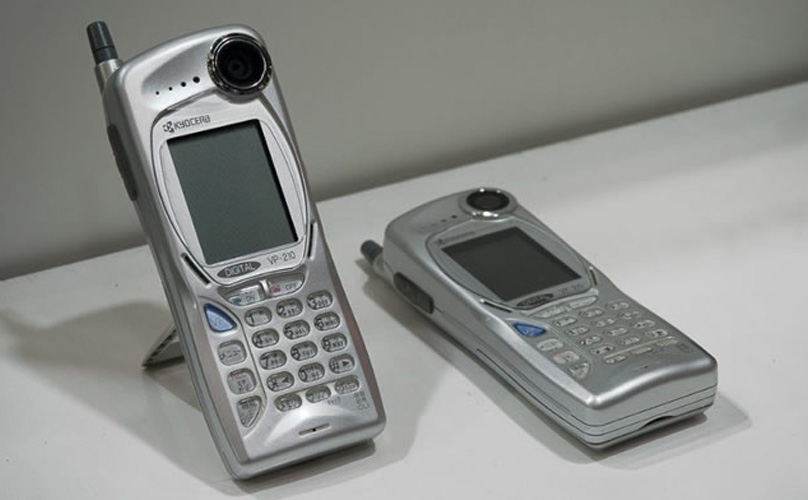
Kyocera VP-210 Science Museum Group

There’s no doubt that the introduction of the first mobile cellular phone was a massive milestone in worldwide communication. However, another major leap in that area was made 20 years ago. In May of 1999, Japan was the launch pad for the Kyocera VP-210. It was the first such phone with a built-in camera that was sold commercially to the general public.

Editor's Pick

Of course, the idea of merging a camera with a mobile phone didn’t come first from Kyocera. In fact, there seems to be some confusion online as to which device was actually the first camera phone (more on that later).

The camera phone prototypes and experiments

Apple video phone The Atlantic/Macworld

Before the launch of the Kyocera VP-210, there were plenty of designs made for mobile phones that had some kind of camera on board. In 1993, Daniel A. Henderson created two prototypes of a “wireless picturephone technology” device called the Intellect. It was a portable product that designed to receive and display images and video from a message center wirelessly. Those two prototypes are now in the Smithsonian’s National Museum of American History.

Editor's Pick

A couple of years later, in 1995, the Macworld print magazine had an article that imagined what Apple might create. According to The Atlantic, Apple actually shared a design for a never released videophone that combined the look of the company’s Newton PDA with a video camera and display.

In 1997, the first working camera phone was MacGyvered into place by Philippe Kahn. His wife was about to give birth to their first child, and Kahn wanted to quickly take pictures and share them with family and friends immediately. The Mercury News reported that he had a Casio QV-10 digital camera with an LCD display, along with a Motorola StarTAC flip phone and a laptop. While his wife was in the hospital, Kahn quickly created a hardware and software interface to connect the camera and the phone via the laptop.

First cellphone camera picture Fullpower

Kahn managed to finish this combo in time for his wife to give birth. The result is that the first cell phone camera image ever made was of Kahn’s daughter Sophie. Because of his work, he was able to quickly share this phone with 2,000 people.

The first camera phone was the Kyocera VP-210

Kyocera VP210 Eyerys

As we mentioned earlier, Kyocera claims to have launched the first camera phone sold to the general public. The announcement of the VP (or “Visual Phone”) 210 was covered by CNN in May 1999. The phone had an 0.11MP camera and could take up to 20 pictures before its onboard storage was full. It even had its own integrated stand so that users could take pictures of themselves. The price for the phone in Japan was 40,000 yen (~$325).

Samsung says it was first with the SCH-V200…

Samsung SCH-V200 GSMArena

It took another year before another mobile phone with a camera went on sale. In June 2000, Samsung launched the SCH-V200 phone in its home country of South Korea. It could take up to 20 pictures at a resolution of 0.35MP, and you could see them on the phone’s 1.5-inch TFT LCD. However, you couldn’t use the phone to send the pictures to someone else directly; you had to hook up the camera portion of the phone to a PC and transfer the photos to your computer in order to do that.

Believe it or not, you can actually buy this piece of mobile phone and camera history. Someone is selling the SCH-V200 on eBay at the moment with the asking price of $599.86. Samsung recently posted an infographic claiming that the SCH-V200 was the first such phone with a built-in camera. As you can see, that claim seems to be “fake news.”

 … or was it the Sharp J-Phone?

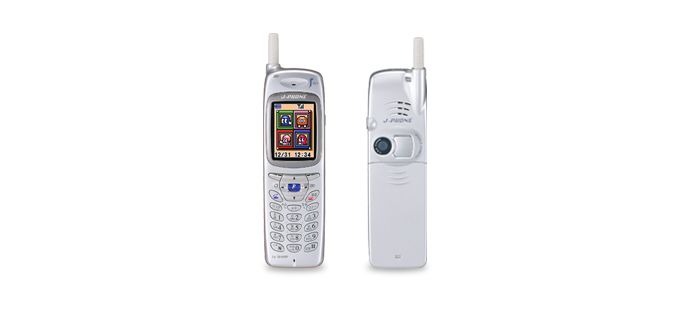
Sharp J-Phone Sharp

In November 2000, the Sharp J-SH04 — better known as the Sharp J-Phone — went on sale in Japan as the third camera phone. The hardware of the phone and camera were truly integrated with each other, unlike Samsung’s phone. This integration allowed the phone’s owners to send the 0.11MP images taken with its camera directly from the device via email. One of the companies that helped with Sharp’s efforts was LightSurf, which, according to B&H Photo, was founded by none other than Philippe Kahn.

The first U.S. camera phone: the Sanyo SCP-5300

Sanyo Camera phone The Telegraph

It took awhile for the camera phone trend to hit the U.S. In November 2002, over two years since the Samsung SCH-V200 launched in South Korea, the Sanyo SCP-5300 (also known as the Sanyo Katana) went on sale in this country, via Sprint. It cost about $400, had a clamshell design, and a camera that could take 0.3MP images. Time magazine once put the phone on its list of the most influential gadgets.

The start of something big

Nokia 9 PureView Review

Once cameras started appearing as a default feature on mobile phones, it was a bygone conclusion that the popularity of small digital standalone cameras would take a big hit. In 2003, The New York Times reported sales of camera phones were already higher than standalone digital cameras. In 2006, camera phones surpassed sales of both digital and film cameras.

Editor's Pick

Today, smartphones have features that were not even considered 20 years ago. We are seeing more and more smartphones with two or more rear cameras, along with cameras with massive sensors. We have software features that make editing images and video a snap, along with special effects like bokeh and more to make your photos look good. A smartphone camera can help us shop, translate text, and even let us play games with AR titles like Pokemon Go.

What do you think the next 20 years will bring in the era of smartphone cameras? Let us know your thoughts in the comments!


from Android Authority http://bit.ly/2W2M7SF

https://ift.tt/2d4kg1q

No matter what kind of business or side hustle you have, having a website helps you reach more people, build trust, and drive sales. For en...